

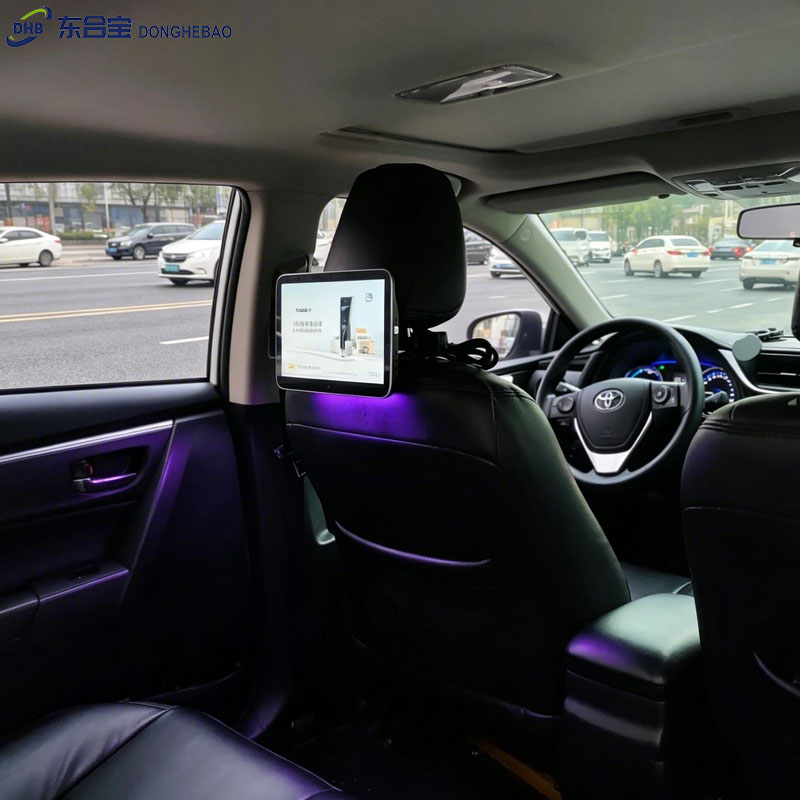
Taxi Advertising Display Light Sensor: A Small Component with a Big Impact
Part 1: How to Enable or Disable the Light Sensor Function
For taxi operators, drivers, and maintenance technicians, knowing how to configure the light sensor is a useful basic skill.
The setting process is simple and can be completed directly through the advertising machine system menu.
Follow these steps:
Step 1: Enter System Settings
From the main interface of the Taxi Rear Seat Display, tap the Settings icon to enter the system settings menu.
Step 2: Enter Factory Settings
In the settings menu, find and select:
Factory Settings
The system will ask for a password.
Step 3: Enter Password
Enter the factory password:
147
Then confirm to enter the factory settings page.
Step 4: Find Light Sensor Settings
After entering the factory settings menu, find:
Light Sensor Settings
Step 5: Enable or Disable the Function
Enter the light sensor setting page.
You will see the enable/disable option.
- The highlighted box indicates that the function is enabled.
- The unselected option indicates that the function is disabled.
Choose the required setting according to your application needs.
Important Note
After changing the light sensor settings, the function may only take effect after restarting the device.
It is recommended to restart the Taxi Rear Seat Display after completing the configuration.
The standard DHB setting path is:
Settings → Factory Settings → Password (147) → Light Sensor Settings
After completing the setting, return to the main interface and restart the device to apply the changes.
Part 2: The Important Functions of the Light Sensor
After understanding how to configure the light sensor, let’s look at why this small component is important for a taxi advertising display.
1. Intelligent Brightness Adjustment for Better Viewing Experience
The most important function of the light sensor is automatic brightness adjustment.
The sensor works like an electronic eye, detecting changes in ambient light conditions and automatically adjusting the display brightness.
During daytime or bright environments:
When the surrounding light is strong, the sensor automatically increases screen brightness.
This helps the display overcome sunlight or strong interior lighting, ensuring that advertising content remains clear, colorful, and easy for passengers to view.
For advertisers, this helps maintain better advertising visibility and communication effectiveness.
During nighttime or dark environments:
When the surrounding environment becomes darker, the sensor automatically reduces screen brightness.
This creates a more comfortable viewing experience for passengers, prevents excessive brightness inside the vehicle, and avoids unnecessary light disturbance.
2. Reduce Power Consumption and Extend Display Lifetime
Taxi vehicles often operate for long hours, and the advertising display may need to work continuously throughout the day.
The screen is one of the main power-consuming components of the display system.
With a light sensor, the screen brightness can be optimized according to real-time environmental conditions.
For example:
- At night
- In underground parking areas
- Inside tunnels
The display automatically reduces brightness, helping to lower power consumption.
This not only reduces battery load but also helps reduce heat generation and extends the lifetime of display components and backlight systems.
3. Improve Driving Safety and Passenger Comfort
This benefit is often overlooked but is extremely important.
During nighttime driving, an overly bright rear seat display may create strong reflections or glare inside the vehicle.
This glare can affect the driver’s view through the rear-view mirror and create potential safety concerns.
By automatically reducing brightness in dark environments, the light sensor helps minimize unnecessary glare and provides a safer driving environment.
At the same time, passengers enjoy a more comfortable viewing experience, reflecting a more thoughtful and human-centered design.
4. Maintain Stable and Consistent Advertising Performance
For advertising operators, ensuring that advertisements are clearly visible at all times is essential.
The automatic brightness adjustment function of the light sensor prevents advertising images from becoming:
- Too bright in strong light environments
- Too dark in low-light environments
This ensures consistent advertising display quality throughout different operating conditions.
As a result, advertisers can achieve better content visibility and maximize the value of their campaigns.
Conclusion
The light sensor is a small but valuable feature of a DHB Taxi Rear Seat Display.
Through automatic brightness adjustment, it improves passenger viewing comfort, reduces power consumption, protects driving safety, and maintains stable advertising performance.
With simple configuration through:
Settings → Factory Settings → Password (147) → Light Sensor Settings
operators can easily enable or disable this function according to different application requirements.
For taxi fleets and advertising operators, the light sensor provides a smarter, safer, and more efficient digital advertising experience.
FAQ
1. What is the light sensor function on a DHB Taxi Rear Seat Display?
The light sensor function automatically detects the surrounding light conditions and adjusts the screen brightness of the Taxi Rear Seat Display.
It helps maintain clear visibility during the daytime while reducing brightness at night to improve passenger comfort.
2. How do I enable the light sensor on a DHB Taxi Rear Seat Display?
To enable the light sensor function, follow these steps:
Settings → Factory Settings → Password (147) → Light Sensor Settings
Enter the light sensor settings page and select the enable option.
After completing the setting, it is recommended to restart the device to apply the changes.
3. What is the factory password for entering the light sensor settings?
The factory password for DHB Taxi Rear Seat Display settings is:
147
After entering the password, you can access the factory settings menu and configure the light sensor function.
4. Why does the light sensor setting not work immediately after changing it?
In some cases, the new light sensor settings may only take effect after restarting the device.
After changing the setting, please return to the main interface and restart the Taxi Rear Seat Display.
5. Can the light sensor function be disabled?
Yes. The light sensor function can be enabled or disabled according to different application requirements.
For example, some operators may prefer fixed screen brightness settings depending on their advertising environment.
6. What are the benefits of using a light sensor on a taxi advertising display?
The light sensor provides several benefits:
- Automatic screen brightness adjustment
- Better viewing experience for passengers
- Reduced power consumption
- Longer display component lifetime
- Reduced nighttime glare
- Improved driving safety
7. Does the light sensor affect advertising performance?
No. The light sensor improves advertising performance by maintaining suitable screen brightness in different environments.
It prevents the advertising content from becoming too bright under strong light or too dark in low-light conditions, ensuring stable visibility.
8. Which DHB products support the light sensor function?
DHB Taxi Rear Seat Displays can be customized with optional ambient light sensor functions depending on the model and customer requirements.
For specific model support, please contact the DHB technical team.
CTA
Need Help With DHB Taxi Rear Seat Display Solutions?
DHB provides professional Taxi Rear Seat Display, Taxi Headrest Display, and Taxi Advertising Display solutions for global taxi operators, advertising companies, and fleet management projects.
Whether you need help with:
- Light sensor configuration
- Firmware settings
- CMS integration
- Hardware customization
- OEM & ODM services
- Taxi advertising display solutions
Our technical team is ready to support your project.
WhatsApp: +8613422871594
Email: kiki@donghebao.com
Contact Us: About Us | Leading Taxi Advertising Company – DHB Taxi Ad
website:https://dhbtaxiad.com/
www.donghebao.com